|
Content Browser, Video Player and Android app update of Aug 2020
To see Video in Hindi of this page click here (Opens in new window)

i) From the Windows version: The two dlls files (msvcp71.dll and msvcr71.dll) are no longer required.
This reduces backoffice process involved with maintaining software files. Also student end errors associated with these dll's are eliminated.
ii) Auto download of 6...jlk file on Windows and 9xRB...jlk file on Android.
This feature enables powerfull automation benefits like:
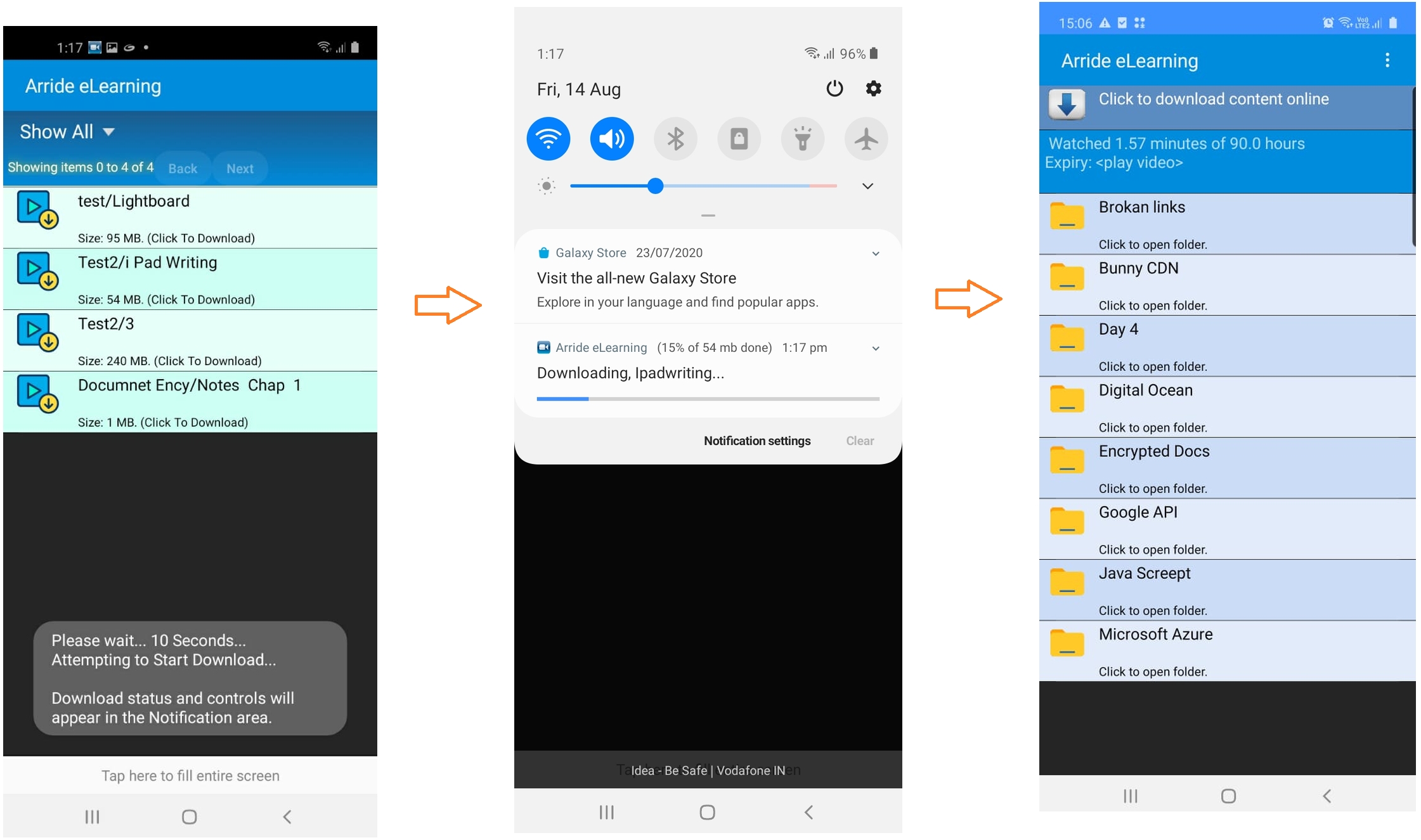
iii) Direct download of videos/docs etc. right within ContentBrowser on Windows and within Android app on Android.
Arride Software on both Windows and Android now supports direct download of content within the software. No need for the student to fiddle with your cloud links and download files manually.
Compitable with most paid cloud accounts like AWS, Digital Ocean (charges @Rs 1 per GB), Bunny CDN (charges @ Rs 2 per GB) etc.
This reduces backoffice process involved with maintaining software files. Also student end errors associated with these dll's are eliminated.
ii) Auto download of 6...jlk file on Windows and 9xRB...jlk file on Android.
This feature enables powerfull automation benefits like:
-
Easy integration with your eCommerce website
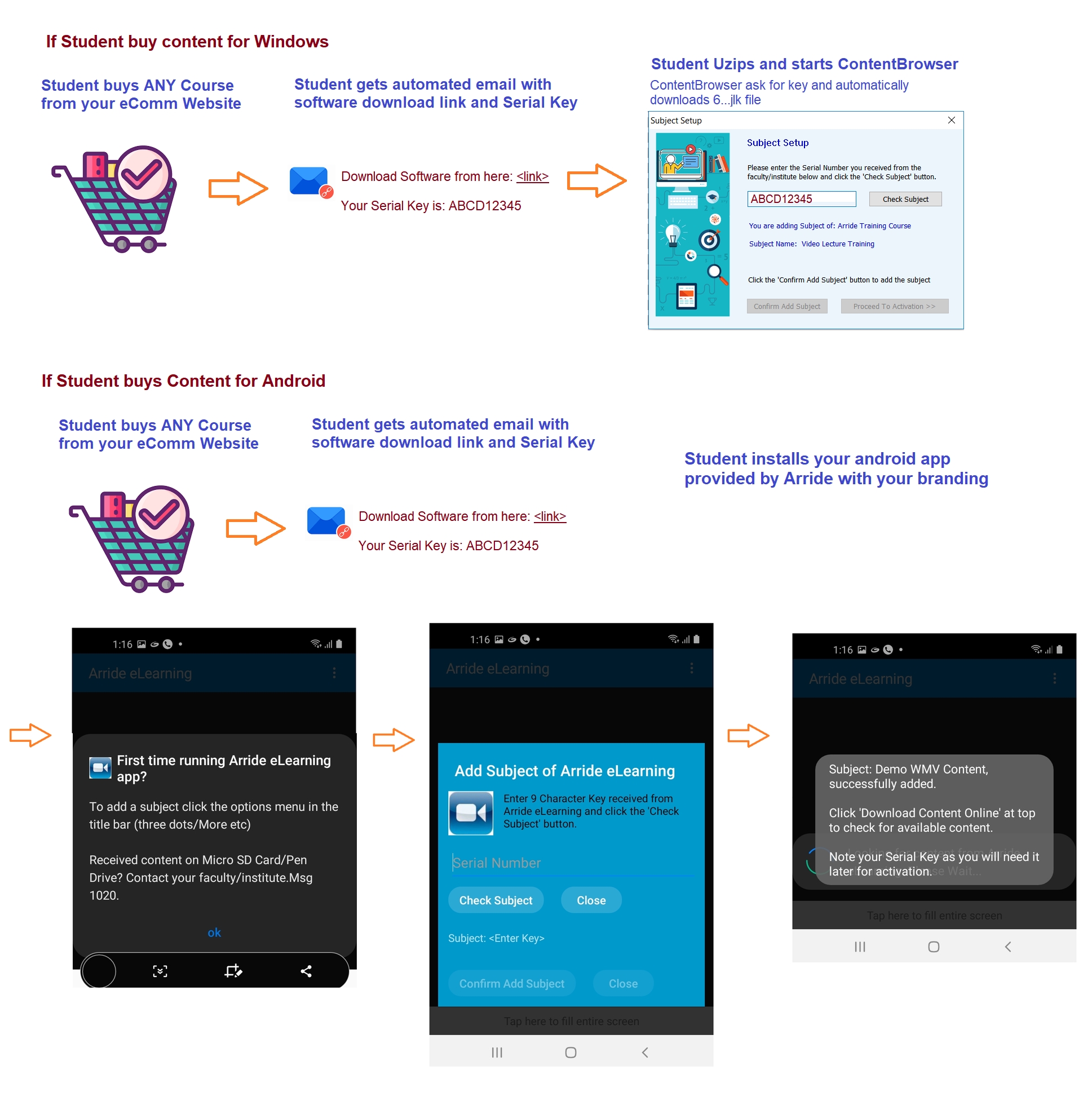
Benefits:- Need to maintain only one software zip. No need to have a seperate software zip's per subject.
- Reduces backoffice effort in maintaining a software zip per subject.
- Easy to update software as updates from Arride are frequent. Now only one software zip needs to be updated.
- This feature combined with the direct download of lectures within ContentBrowser can give a powerfull instant buy and start learning experience to the student.
Instructions for your website developer to integrate direct download of Arride Windows/Android software:- Have one common link for Windows software and another for Android software.
- Create facility to import Serial Keys csv exported from Arride backend to the website per subject.
- On checkout by student issue one Serial Key for the subject from the csv imported earlier.
- Email the software link and Serial Key to student.
- A much smoother activation experience for the student
- With lesser software files, all student has to do is start ContentBrowser.
- Software start is now reduced to only 2 steps.
- Less errors due to mistakenly given mismatch config files and Serial Keys by faculty/institute.
- Easy back office operations management of ContentBrowser/VideoPlayer software
- There is no longer any need to keep an individual software zip for each subject. You need to have only one software zip now for all subjects.
- Less efforts to keep track of config files and Serial Keys by faculty/institute.
iii) Direct download of videos/docs etc. right within ContentBrowser on Windows and within Android app on Android.
Arride Software on both Windows and Android now supports direct download of content within the software. No need for the student to fiddle with your cloud links and download files manually.
Compitable with most paid cloud accounts like AWS, Digital Ocean (charges @Rs 1 per GB), Bunny CDN (charges @ Rs 2 per GB) etc.
-
On Windows Content Browser:

-
On Android, Your Branded Arride Technologies App: