Arride Technologies

Arride Labs
   Serial Numbers Usage Log and Multi-Use Locking


This technology is currently implemented on these platforms:       
The following is a work in progress, there could be some changes as implementation nears completion.
Background Information and General Overview:
  1. Students sometimes get the same subject Pen drive/Download/DVD activated on two (rarely three) computers by calling in with problems like PC crash, PC damaged, laptop lost/damaged etc.

  2. While majority of the calls are geniune, there are a small percentage of student's who try to trick the institute into activating the content on multiple computers.

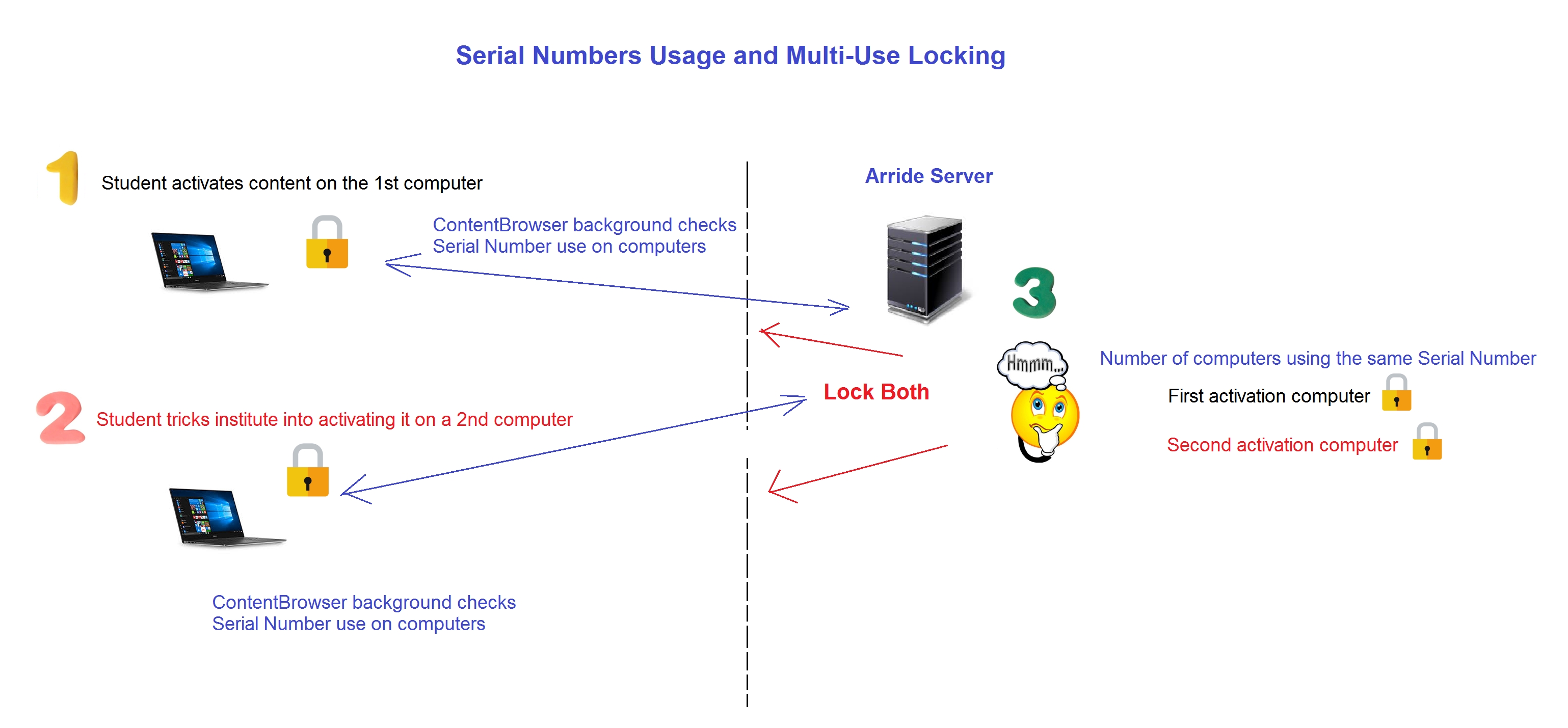
  3. In usage log mode whenever a student system connects to the internet, ContentBrowser attempts to maintain a log on Arride's server every now and then at random intervals of a particular Serial Number's usage on different systems. If it finds that more than one system is using a Serial Number AFTER the last activation using that Serial Number, then ContentBrowser on the currently connected computer locks up. If the other computer/s on which the same Serial Number is activated is/are online at the same time or come online later - then the other computer/s will get locked up as well.

    Faculty/Institute can then decide which computer to allow, leaving the other computer/s locked.

Steps to unlock a computer:
  1. Ask student for remote access to the PC he would like to unlock.
  2. Copy ResetTool to the PC the student wants to unlock. Enter password and Detect content sets activated. Computer ID should show towards the top of ResetTool
  3. Match the first 8 characters of the ID showing in the Reset Tool with the ID showing on the 'PC Usage Log Page'
  4. Also match the configuration of the PC the student wants unlocked with the configuration showing up on the 'PC Usage Log Page' (To see PC configuration in detail: Click on Windows Start type 'dxdiag' without the quotes, wait for Windows to find the program and hit enter).
  5. Using Reset Tool - Unlock the PC you want to allow by entering Reset password.
  6. Important: On the 'PC Usage Log Page' - click button 'Ignore Lock' against ALL the PCs which are showing as locked. Repeat: Click the 'Ignore Lock' button against ALL the PCs which are showing as locked.


How PC Serial Number multi-use locking works:

What are the risks with this technology?
  1. Technology is under test and not guranteed to work 100% of the time, Arride will make changes and adjustments based on feedback.

  2. False positives - Although remote, the chance of false positives exist. Steps to take care of false positives are the same steps to Unlock a PC as given above.


FAQs:
  1. Do the two or more PCs on which content is being viewed have to be online at the same time?

    No, the PCs can come online one after the other. In this case the 2nd, 3rd... PC which comes online will be locked.


Limitations:
  1. Nothing to show here.